What to prepare
A clear product image showing the whole piece. For a specific wearer, also provide a reference portrait you are licensed to use, and state whether it is a necklace, earring, ring or bracelet.
KunYan Jewelry AI try-on covers necklaces, earrings, rings and bracelets. Bring a clear product photo and an authorized wearing reference, then check stones, placement and proportion. The image does not replace real measurements.
A clear product image showing the whole piece. For a specific wearer, also provide a reference portrait you are licensed to use, and state whether it is a necklace, earring, ring or bracelet.
Images that show styling and wearing mood, ready to combine with white-background shots, scene images and detail modules for launch.
Jewelry e-commerce operators, brand content teams, DTC merchants and launch teams.
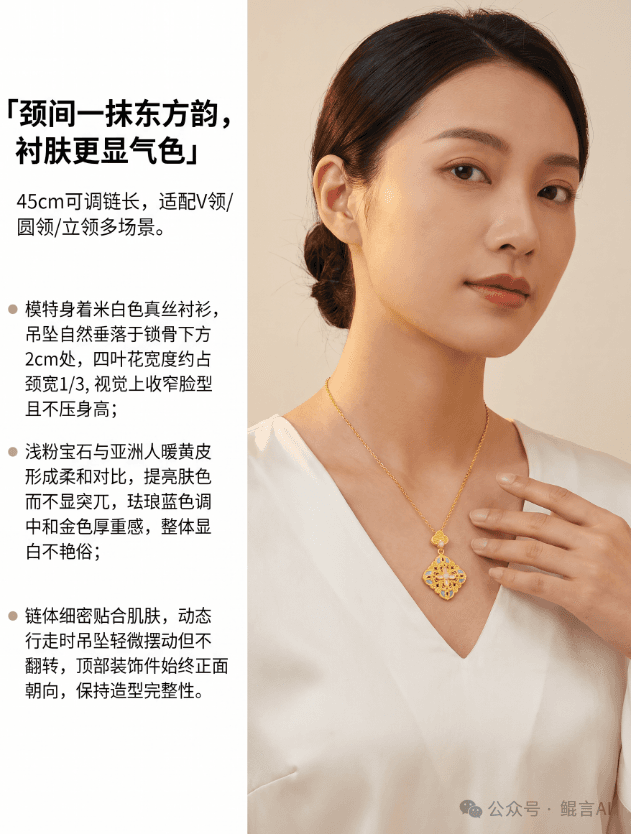
Keep the whole piece visible without heavy overlap or overexposure; note the category and known sizes.
Pick the body area and styling; prepare a suitable reference if a specific person is needed.
Compare original and result side by side — structure, placement, scale and overlap. Adjust the input or regenerate if needed.
Combine approved wearing shots with white-background, detail images and specs for a consistent store look.
Necklaces, earrings, rings and bracelets. Choose the actual category and provide a clear product image and wearing reference.
Scale needs a manual check and can’t replace real dimensions or photo references. Publish verified size specs alongside.
Check that structure and colour match, placement is plausible and overlaps look natural, and confirm image rights and product information.
Design jewelry with the KunYan Jewelry AI model: sketch to render, reference restyles and collections. State category, metal, stones and what must stay, then check outline and settings before craft review.
See features & workflow →RELIEF & STLTurn a jewelry photo into full 3D, relief or a size chart. Relief can export STL. Check the source image, thickness and proportion first. Use the result to talk with the factory, not as a production file.
See features & workflow →Open the workspace to see current features, or contact us about plans, availability and demos.
Back to Jewelry AI overview →