What to prepare
A source image with a clear outline and subject. Relief tasks also need target width, minimum and maximum thickness and relief direction; for full 3D, check visible structure and occlusion.
Turn a jewelry photo into full 3D, relief or a size chart. Relief can export STL. Check the source image, thickness and proportion first. Use the result to talk with the factory, not as a production file.
A source image with a clear outline and subject. Relief tasks also need target width, minimum and maximum thickness and relief direction; for full 3D, check visible structure and occlusion.
The craft workspace offers full 3D, relief and size-chart tasks. Relief tasks output a depth map or STL for preview and evaluation. Formats and availability differ by task.
Jewelry and craft designers, relief makers and companies validating an image-to-relief workflow.
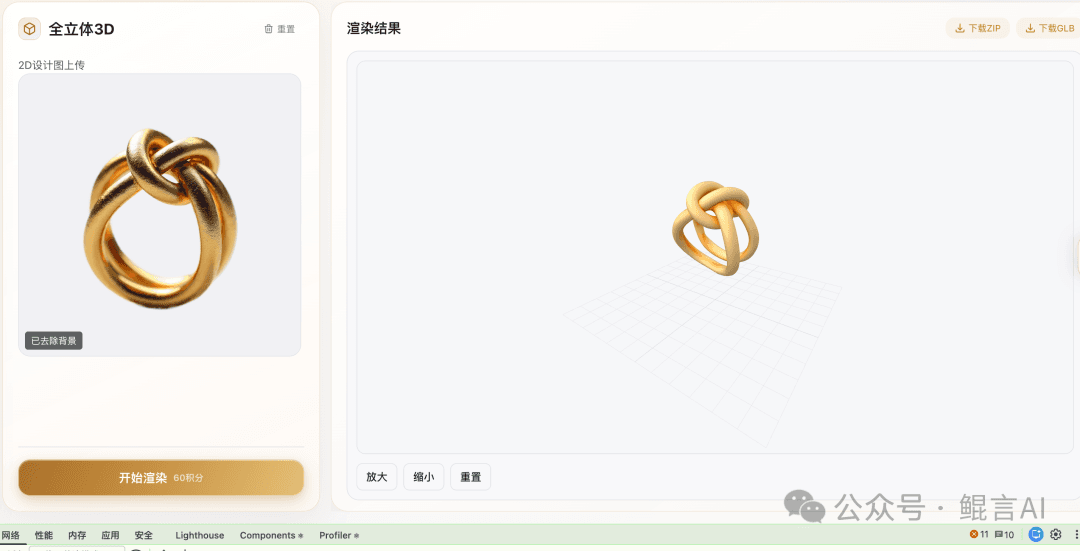
Use images with a clear subject and distinct layers; remove backgrounds and text that shouldn’t become relief.
Enter target width, base thickness and depth range; flip raised and recessed areas if needed.
Inspect the depth map or STL from the side, at the edges and in detail, and make sure textures didn’t create odd bumps.
Verify units, mesh and manufacturing requirements in your own software, fix as needed, then sample or machine.
Full 3D, relief and size charts. Relief can export STL; depth-map tasks output an image. Check formats for full 3D in the workspace. Always inspect the model before making.
Full 3D shows the piece in the round; relief expresses the layers of a flat image. Neither proves a complete CAD structure or manufacturability.
Check real size, base thickness, weak areas and mesh quality, and confirm machine requirements first. Without preview and craft review it is not a production file.
Design jewelry with the KunYan Jewelry AI model: sketch to render, reference restyles and collections. State category, metal, stones and what must stay, then check outline and settings before craft review.
See features & workflow →JEWELRY TRY-ONKunYan Jewelry AI try-on covers necklaces, earrings, rings and bracelets. Bring a clear product photo and an authorized wearing reference, then check stones, placement and proportion. The image does not replace real measurements.
See features & workflow →Open the workspace to see current features, or contact us about plans, availability and demos.
Back to Jewelry AI overview →